Hayfever: Crafting Playful, Hay-Textured Typography
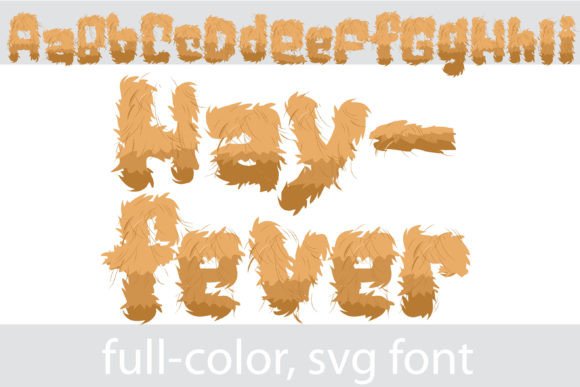
Imagine a font that doesn't just spell out words, but captures a feeling, a season, or a texture. This is the power of Hayfever, a full-color font that transforms your text into vibrant, hay-like lettering, instantly infusing designs with personality and charm. In a digital landscape saturated with standard sans-serifs and predictable serifs, embracing unique typographic resources like this is key to standing out and forging a memorable visual connection.
Understanding the Technology Behind the Texture
Hayfever is more than a novelty; it's a sophisticated OpenType full-color (SVG) font. This technology embeds vector graphics directly into the font file, allowing for multi-color, textured, or illustrative glyphs that install and function like any standard .otf file. For designers, this means seamless integration into your existing design workflow. You install it via FontBook on a Mac or your preferred font manager on Windows, and it appears in your application's font menu. A crucial note for professional presentation: while these fonts show as black in non-compatible programs, they reveal their full, colorful glory in supporting software like Adobe Illustrator, Photoshop, Silhouette Studio, Quark, and Inkscape. You'll know your program supports it when the color renders on the document canvas itself.
Practical Applications for Impactful Design
The true value of a creative asset like Hayfever lies in its application. Its vector-based nature ensures it scales flawlessly for any project, from a small social media icon to a large-format banner, without losing quality. Consider its potential across these domains:
- Branding & Logo Design: Instantly communicate a rustic, organic, playful, or seasonal brand identity. Perfect for farms, bakeries, craft breweries, summer festivals, or children's brands.
- Marketing & Social Media Graphics: Create scroll-stopping headlines for Instagram stories, Facebook ads, or email campaigns. The texture adds depth and visual interest that flat color cannot match.
- Website & UI Design: Use it strategically for hero sections, call-to-action buttons, or featured content headers to inject personality into a web design project, enhancing the overall user experience.
- Packaging & Editorial Design: Elevate product labels, book covers, or magazine spreads with typography that doubles as illustration, supporting the narrative through visual hierarchy.
- Presentations & Merchandise: Make corporate slides or custom merchandise (like t-shirts and mugs) more engaging and memorable with unique, textured type.
Integrating Unique Fonts into Your Design System
When incorporating a distinctive font like Hayfever, thoughtful integration is paramount. Always consider your color palette—ensure the font's embedded colors complement your brand scheme or the project's mood. Readability is key; such fonts are best used for headlines, logos, or short bursts of text rather than long paragraphs. Maintain visual hierarchy by pairing it with a clean, neutral font for body copy to ensure clarity. Before finalizing, always test the font in your specific design software to confirm compatibility and see the colors as intended. This due diligence ensures the asset enhances, rather than hinders, your communication.
Ultimately, tools like Hayfever represent the exciting intersection of technology and creativity in modern graphic design. By selecting creative assets that align with your project's goals and audience expectations, you move beyond mere decoration to create work that resonates, engages, and tells a compelling story. In the realm of visual design, the right typography doesn't just display words; it gives them life, texture, and unforgettable character.